We all know the common saying: “If you build it, they will come.”
Well, unfortunately that’s not the case, especially not on the Internet.
You can create profiles and websites all over the place, but if they’re not optimized or providing value to visitors, you’re wasting time and probably money.
Constructing your LinkedIn profile correctly in order to build a strong, wide network is a necessary condition to achieving that goal.

Creating an effective LinkedIn business profile can take you to the next level. Generate more leads and get more job offers by following some simple profile optimization tips. Image credit to uptodatetech.com.
Think of yourself as a brand and consider your LinkedIn profile a service product of that brand. Then, apply the concept of tangibility discussed in our post about the ROI of social media.
Make your profile tangible. Make people understand who you are and why they should care about anything you have to offer.
Much like a paper resume, you only get maybe 30 seconds to a minute to accomplish that.
Let’s break down a LinkedIn profile section-by-section and take a deeper look…
Professional Headline
In terms of grabbing peoples’ attention and building credibility, your headline may very well be the most important aspect of your profile. Besides your picture, the headline will be the first thing people see.
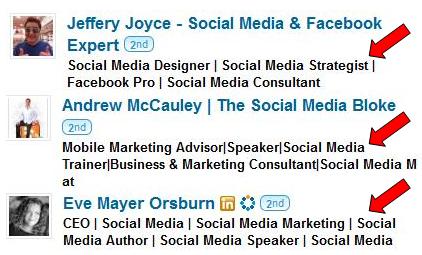
LinkedIn Headlines should immediately start building credibility and trust with viewers. Give them an idea of what industry you’re in, what skills you can offer, and why they should care about connecting with you.
The main goal here is to hit major keywords related to the questions below:
- In what industry are you employed?
- What positions do you hold?
- In what areas do you have a wealth of knowledge and expertise?
Keep in mind that tons of people look for connections using LinkedIn’s search function. By hitting the right keywords, you’re more likely to rank higher in LinkedIn search results and, therefore, more likely to get new visitors to your profile.